what3words: Navigation & Maps
- 3.4
- Rating
- 10.00M
- Installs
- Free
- Price

 Analysis by App-foxy
I came away from what3words with a simple conclusion: it is most useful when a normal street address is too vague, awkward, or unavailable. Rather than asking someone to describe a complicated entrance or search through a long list of map pins, the app gives a precise three-word label to a small area. That idea sounds niche at first, but it becomes surprisingly practical when meeting people outdoors, sharing a delivery point, or identifying a spot that does not have a memorable address.
It is a free navigation app from what3words, designed for everyone and available on Android devices running at least version 7.1. The app has been around since June 2013, and its reach is substantial, with over ten million installs. Its average score is 3.8 from around forty-six thousand ratings, which feels fair to me: the central idea is genuinely clever, but the usefulness depends heavily on whether the people and services around you understand how to use it.
Why three words can be more useful than a pin
Most map apps are built around roads, businesses, landmarks, and conventional addresses. Those tools are excellent when I am driving to a named place or walking to a clearly marked building. The trouble starts when the destination is a particular gate, field entrance, campsite position, beach access point, loading area, or meeting place inside a large venue. A dropped pin can help, but pins are easy to move accidentally, difficult to describe verbally, and sometimes confusing when several entrances sit close together.
You May Also Like

 Blood Strike: 2.5 Anniversary
Blood Strike’s Loadouts Turn Every Drop Into a Tactical Gamble
A close look at Blood Strike’s custom loadouts: how fast access to signature weapons reshapes its battle royale rhythm, rewards preparation, and narrows the gap between fights.

 Pandora - Music & Podcasts
Pandora’s Music Is Easy to Start, but Harder to Recover
Pandora’s strength is its low-effort path from a seed to a station. Its weak spot is how much confidence it asks you to place in connection, setup, and quiet recovery.

 8 Ball Pool
 Is Built on Rivalries, Rematches, and Routine
A close look at the rivalries, rematches, shared routines, and unanswered safety questions that turn a quick pool match into a persistent mobile community.

 Samsung Music
’s Quiet Strength Is Playing What You Already Own
Its reach comes less from spectacle than from dependable access to a personal library. That simplicity is both the app’s strongest retention engine and its ceiling.

 AccuWeather: Weather Radar
AccuWeather Review: A Quick, Clear Forecast for Everyday Decisions
For everyday plans, the best forecast is the one you can understand quickly. AccuWeather makes rain timing, radar, and local conditions easy to act on, with a few trade-offs.

 Hill Climb Racing
Why Hill Climb Racing Still Turns Crashes Into One More Run
A tiny car, a bumpy hill and one more upgrade: Hill Climb Racing keeps resurfacing because its simple chaos makes every near-miss feel personal.
More From Our News Desk



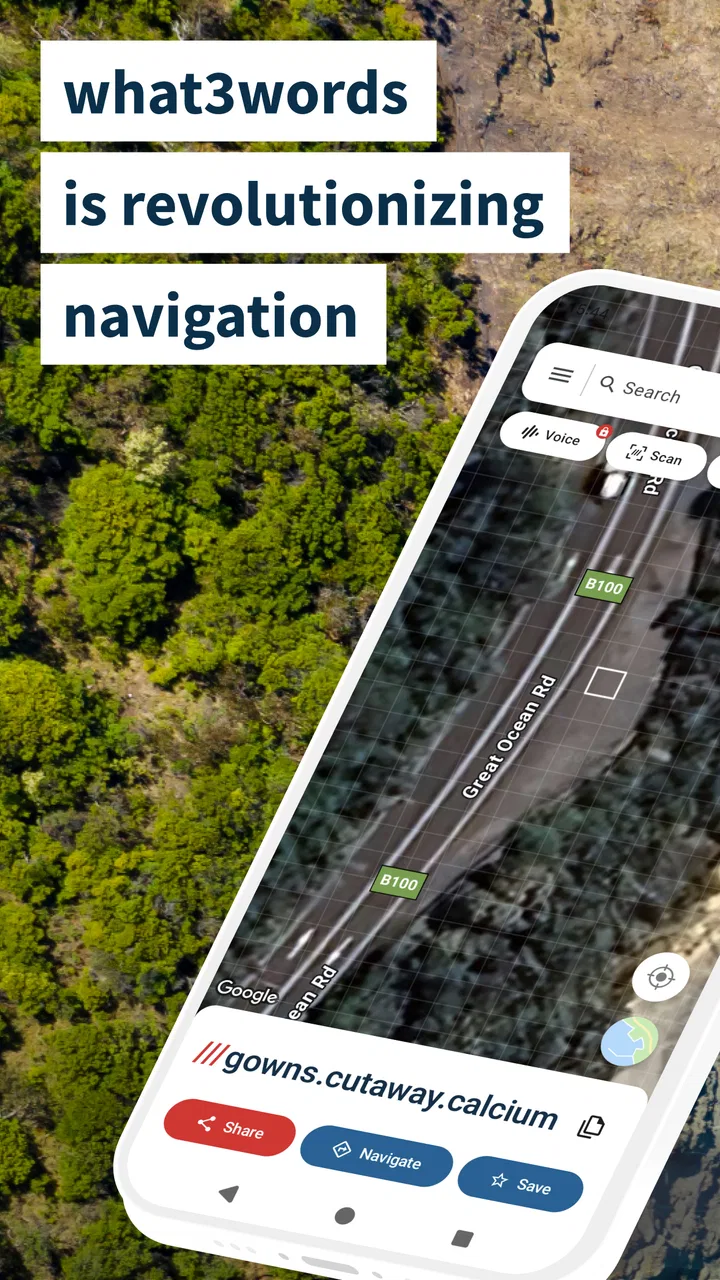
what3words approaches that problem by dividing the world into tiny squares and assigning each one a unique combination of three words. I can use the app to find the words for my current position, search for a three-word address someone has sent me, or select a specific point on the map. The result is easier to say aloud than a long coordinate and more exact than “I’m near the big tree on the left.”
The distinction matters in real conversations. If I tell a friend to meet me at a particular entrance, a conventional address may lead them to the correct building but not the correct side of it. A map pin may open in their preferred mapping app, but it can still be interpreted loosely. A three-word address gives us a shared target. The app is at its best as a communication tool for location, not as a replacement for every traditional navigation app.
That makes it especially interesting for places designed around open space rather than numbered streets. At a festival, for example, I could identify a meeting area without relying on a temporary sign that might be hard to see. On a walking route, I could mark a viewpoint or trail junction that has no formal address. For a rural property, the three words can point toward a precise area even when the postal address covers a broad stretch of land.
Finding a location without guessing at the entrance
One of the strongest parts of the experience is the way the app encourages me to think about the final few metres of a journey. Standard navigation often gets me to a road or building and leaves the rest to my eyes. what3words makes that last part explicit. I can share the square I actually want someone to reach rather than assuming that the nearest road name is enough.
This is useful for everyday plans. Imagine meeting a friend at a large park. Saying “meet me by the northern entrance” may still require a phone call, especially if there are several paths and no obvious signs. Sending a three-word address lets the friend search for the same small area. They may still need to follow a walking route from the nearest accessible road, but the destination itself is less ambiguous.
The same workflow can help with home deliveries when the property has an unusual entrance. If a driver normally stops at the main address but the practical drop-off point is around the back, a precise location can reduce the back-and-forth. I would still include written instructions, because words alone do not explain gates, locked paths, parking restrictions, or which approach is safe. The app improves the location reference; it does not replace common sense.
There is also a useful distinction between selecting a location and navigating to it. A three-word address can identify the destination, but the best route may still come from another mapping service that knows more about traffic, public transport, road closures, or turn-by-turn guidance. In my view, this is not a flaw in the concept. It is a reason to treat what3words as a precise location layer that can work alongside ordinary maps.
A practical workflow for sharing meeting points
For a normal day, I would use the app in a short sequence. First, I would open the map and locate the destination visually. Then I would make sure the selected square is actually accessible, rather than simply being closest to the person or object I have in mind. Finally, I would share the three words with a short explanation such as “use the east gate” or “this is the picnic area, not the car park.”
That last step is important. The app can be precise while the surrounding instructions remain poor. A square may be on the wrong side of a fence, across a river, inside a restricted site, or on a road that pedestrians cannot safely reach. I found the most reliable approach was to use the three words as the exact reference and ordinary language for access details.
When receiving a location, I would also check the map before setting off. The words may identify the intended spot, but the route offered by a separate navigation app could take me to a nearby road rather than the actual entrance. Looking at the satellite or street context, where available through the mapping tools I already use, can prevent a frustrating final approach.
Another non-obvious benefit is reducing ambiguity in group chats. A written description can be interpreted differently by several people, while a shared three-word address gives everyone one destination to search. This is particularly handy when plans change. If the group moves from a café to a nearby plaza, I can send a new location reference without rewriting a long explanation of where to stand.
Where the idea becomes less convenient
The main weakness is not that the system lacks precision; it is that precision only helps when everyone involved understands the system. If I send three unfamiliar words to someone who has never used the app, they may not know which application to open or may assume the words are a casual description. That creates an extra step compared with sending a familiar street address or a map pin.
The words themselves can also be easy to mistype or mishear. Three ordinary words are more memorable than a string of coordinates, but they are not automatically foolproof. Similar-looking or similar-sounding combinations can cause trouble if someone copies them incorrectly. I would always send the exact spelling through a message rather than relying on a hurried phone call.
There is a learning curve around the difference between a square and a general point. A recipient may expect the words to identify a doorway, vehicle, or trail marker with physical precision, while the system identifies a defined area. That area is very small, but it still does not tell a person how to cross a fence, find a footpath, or avoid an unsafe roadside position. The app can make a destination exact on the map without making it physically reachable.
I also would not choose it as my only navigation solution for a long drive. Traditional navigation apps remain better suited to route planning, live traffic, road guidance, public transport, and familiar address searches. what3words can help define the endpoint, but it is not the tool I would open first when I need a complete journey plan with multiple stops and changing travel conditions.
How it compares with pins, coordinates, and street addresses
A dropped pin is the closest alternative for many people. Pins are quick, widely understood, and often easy to share from a standard map. Their weakness is that they can be placed imprecisely, especially on a small phone screen, and the recipient may not know whether the pin marks the entrance, the centre of a venue, or simply the point the sender touched by mistake. what3words adds a repeatable label to the selected area, which can make the exchange clearer.
GPS coordinates are more universal for technical or professional use, but they are unpleasant to read aloud and easy to transpose. They are excellent when a user already works with mapping equipment or specialist software. For an ordinary conversation, three words are more approachable. I would choose coordinates for a technical workflow and what3words for sharing a precise place with friends, visitors, or customers who prefer normal language.
Street addresses remain the best choice when they are complete, recognized, and connected to a usable entrance. They work naturally with postal services, taxi drivers, businesses, and emergency systems that already depend on address databases. The advantage of what3words appears when the address covers too much space, does not identify the right access point, or simply does not exist in a useful form.
This makes the app complementary rather than competitive. I would not replace every saved address with a three-word address. Instead, I would keep the street address for the broad destination and use the three words for the exact place where someone should arrive. That combination is more robust than relying on either one alone.
Who will get the most from the app
I think it is a strong fit for people who spend time outdoors, organize gatherings, visit rural areas, or regularly need to explain unusual meeting points. Hikers can use it to identify a viewpoint or rendezvous area. Families can share a precise location at a park or beach. Event organizers can communicate a particular entrance or assembly point. Small businesses with awkward delivery access may also find it useful when a normal address does not tell a driver where to go.
It can be valuable for visitors who are unfamiliar with a large site. A museum or sports venue may have several entrances, while a park may have multiple car parks and paths. A three-word address can reduce the uncertainty around the final meeting point, provided the sender also explains how to approach it.
I would be more cautious if most of my navigation needs involve routine commuting, public transport, or turn-by-turn driving. In those situations, a conventional map application is usually faster and more familiar. I would also hesitate to depend on it for time-critical directions unless I had already checked the route and access conditions. A precise square does not guarantee a clear road, open gate, or safe stopping place.
People who frequently share locations with users who are unwilling to install or learn another mapping tool may also find the benefit limited. The concept is easy to explain, but it still introduces a new vocabulary into an otherwise simple exchange. For occasional use, sending a standard pin may be more convenient. For repeated problems with vague destinations, the extra step starts to pay off.
Cost, accessibility, and the everyday experience
The app is free to download, with optional in-app purchases listed from $4.69 to $39.99 per item. That means I can explore the core idea without paying at the outset, while some additional functions may involve a purchase. I appreciate being able to test whether the location-sharing method fits my habits before committing money.
Its Everyone content rating makes it approachable for families and mixed-age groups. The minimum operating system requirement is Android 7.1, so it remains accessible to many older devices, although the practical experience will still depend on the phone’s screen, location services, connection, and battery condition.
The developer, what3words, has focused the product around a very specific problem: turning exact map areas into something people can communicate in ordinary speech. That focus is its strength. The interface does not need to compete with every feature found in a full navigation suite to be useful. It needs to make selecting, reading, and sharing a location understandable.
My advice is to test it before an important trip rather than discovering its workflow at the destination. Search for a familiar place, select a nearby entrance, and see how the result appears when shared. Then check whether the recipient can open and interpret it. This small trial reveals whether the app fits your group and prevents the most common source of frustration: a technically correct location that nobody knows how to use.
My final view after using it
what3words solves a narrow problem unusually well. It gives me a simple way to identify a precise area when a street address is too broad and a map pin feels too vague. Its best moments come in parks, rural locations, large venues, unusual entrances, and group meetups where the last part of the journey causes confusion.
Its limitations are equally clear. It does not remove the need for access instructions, it is not a full substitute for route-planning software, and its usefulness drops when recipients are unfamiliar with the system. I would never send only the three words for a complicated or safety-sensitive destination. I would pair them with the venue name, entrance details, and a normal map route whenever those details matter.
For me, the right way to think about it is as a precision tool that sits beside ordinary maps. If you often say “I’m somewhere near this entrance” or “meet me by the path after the car park,” it is worth trying. If nearly all your destinations already have clear addresses and you mainly need traffic-aware directions, another navigation app will probably remain your daily driver.
Overall, I recommend it to people who need to share exact places more often than they need another complete map. The 3.8 average from roughly forty-six thousand ratings reflects a product with a smart, practical idea and some real-world friction. When used for the situations it was designed to handle, what3words turns vague location sharing into a much clearer conversation.
FAQs for what3words: Navigation & Maps
01What is what3words and how does it work?
what3words is a navigation app that divides the world into a grid of 3m x 3m squares, each identified by a unique combination of three words. This system allows users to pinpoint any location with precision, making it easier to share and find places without needing complex GPS coordinates.
02Is what3words free to use?
Yes, the basic features of what3words are free for personal use. Users can download the app from both Android and iOS app stores without any cost and use it to find or share locations. However, some advanced features or business solutions might require a subscription or a one-time purchase.
03How accurate is what3words compared to traditional GPS systems?
what3words offers a high level of accuracy within a 3m x 3m area. While traditional GPS can offer precise coordinates, the three-word system simplifies sharing and remembering locations. It’s especially useful in places with poor addressing systems or vast open areas where GPS coordinates might be cumbersome to share.
04Can what3words be used offline?
Yes, what3words can be used offline. Users can download maps for offline use, which is particularly useful in areas with unreliable internet connectivity. This feature ensures that users can still find and share locations even when they are off the grid.
05What are the main benefits of using what3words?
The main benefits of using what3words include its simplicity and precision. It’s ideal for situations where traditional addresses are inadequate or unavailable. It also enhances safety by allowing users to share exact locations quickly, which can be crucial in emergencies or when exploring unfamiliar areas.
Pros
- Accurate pinpointing of locations.
- Easy to remember three-word addresses.
- Works offline with preloaded maps.
- Integrates with other map apps.
- Enhances delivery and travel precision.
Cons
- Limited language support for some users.
- Requires internet for initial setup.
- Not a full-feature navigation app.
- Dependent on correct input of words.
- Less effective in densely populated areas.

what3words: Navigation & Maps
Gallery